
SadaPay · Biometric Verification
Increasing wallet limits without a branch visit
New SadaPay accounts started with a monthly wallet limit of PKR 50,000. To increase it to PKR 200,000, customers had to visit a NADRA e-Sahulat location, scan their fingerprints and wait up to 24 hours for approval.
In four weeks, I designed an in-app Biometric Verification System that used a phone camera to guide customers through fingerprint scanning securely. The work had to make a regulated identity check feel simple while respecting the limits of a third-party SDK.
- Role
- Product Designer
- Timeline
- 4 weeks
- Product
- SadaPay mobile app
- Scope
- End-to-end biometric verification
- Collaboration
- Product, engineering and the BVS team
- Period
- 2022
A digital product with an offline bottleneck
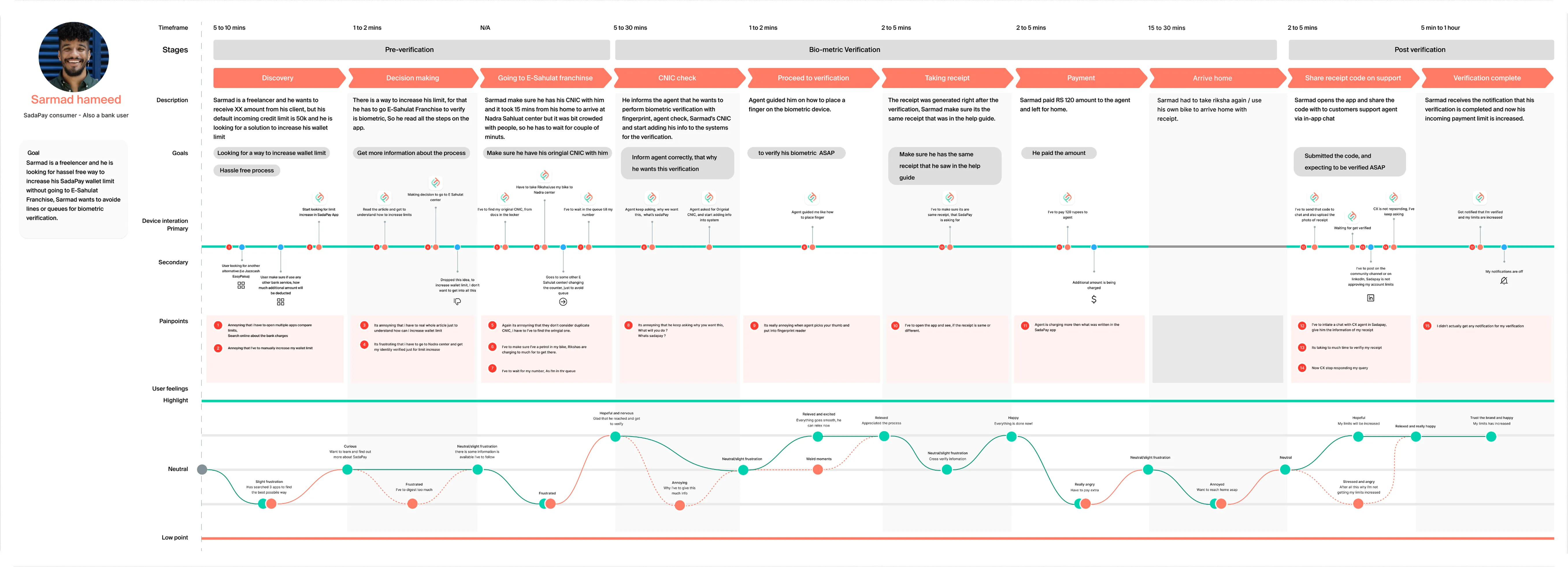
The task was important, but the journey sat outside the app. Customers had to discover the process, find a participating location, travel with their original identity card, queue for an agent, pay a fee, keep a receipt and contact support with its code. Only then could they wait for confirmation.
That friction affected everyday customers approaching their limit, small business owners moving more money and anyone who needed extra capacity quickly. It also created a compliance bottleneck that limited SadaPay's ability to grow accounts.
The four-week goal
The design goal was simple: create a secure, accessible in-app route for increasing a wallet limit, then test and refine it within the technical boundaries of the BVS SDK.
Simple
Make a regulated task understandable without specialist knowledge.
Secure
Protect identity and explain why camera and biometric access were needed.
Recoverable
Give users a clear next step when permissions, scanning or verification failed.
We defined account-limit upgrades, BVS adoption and user satisfaction as the main success signals. These were measurement goals, not outcome figures available for this case study.
We designed for situations, not one perfect user
Journey mapping showed that BVS could appear at very different moments. A new customer might meet it during onboarding, while an existing customer might find it only after a payment or withdrawal exposed the lower limit. Camera quality and the physical setting also changed what successful guidance looked like.
New customers. Introduce verification as part of account setup without making KYC feel longer.
Existing customers. Make the limit upgrade easy to find when the need appears later.
During KYC. Connect identity verification and BVS without creating a repeated journey.
At an ATM. Help someone understand the limit and what they can do when access is urgent.
Weak cameras. Give clear guidance and recovery when image quality makes scanning difficult.
The SDK shaped the experience
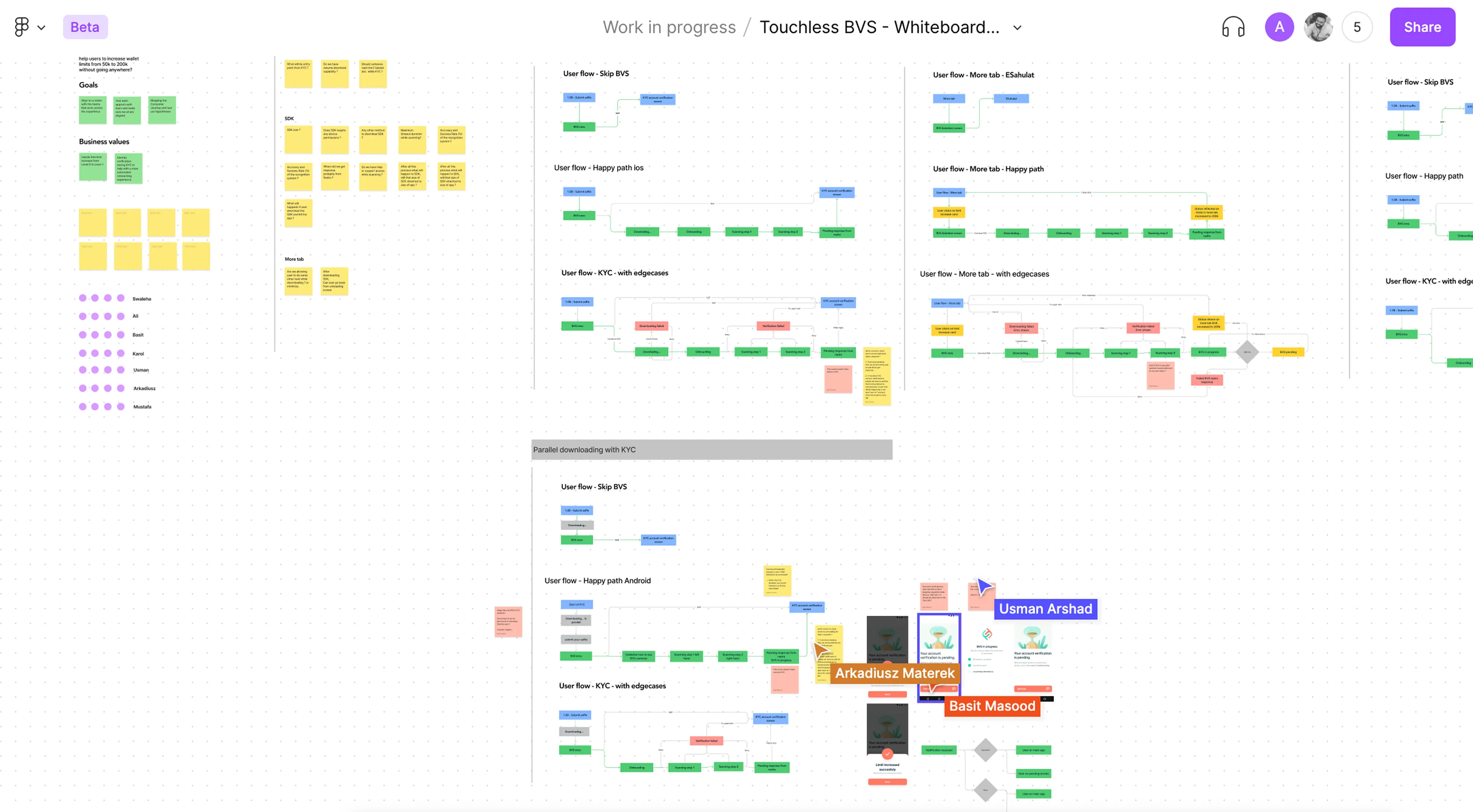
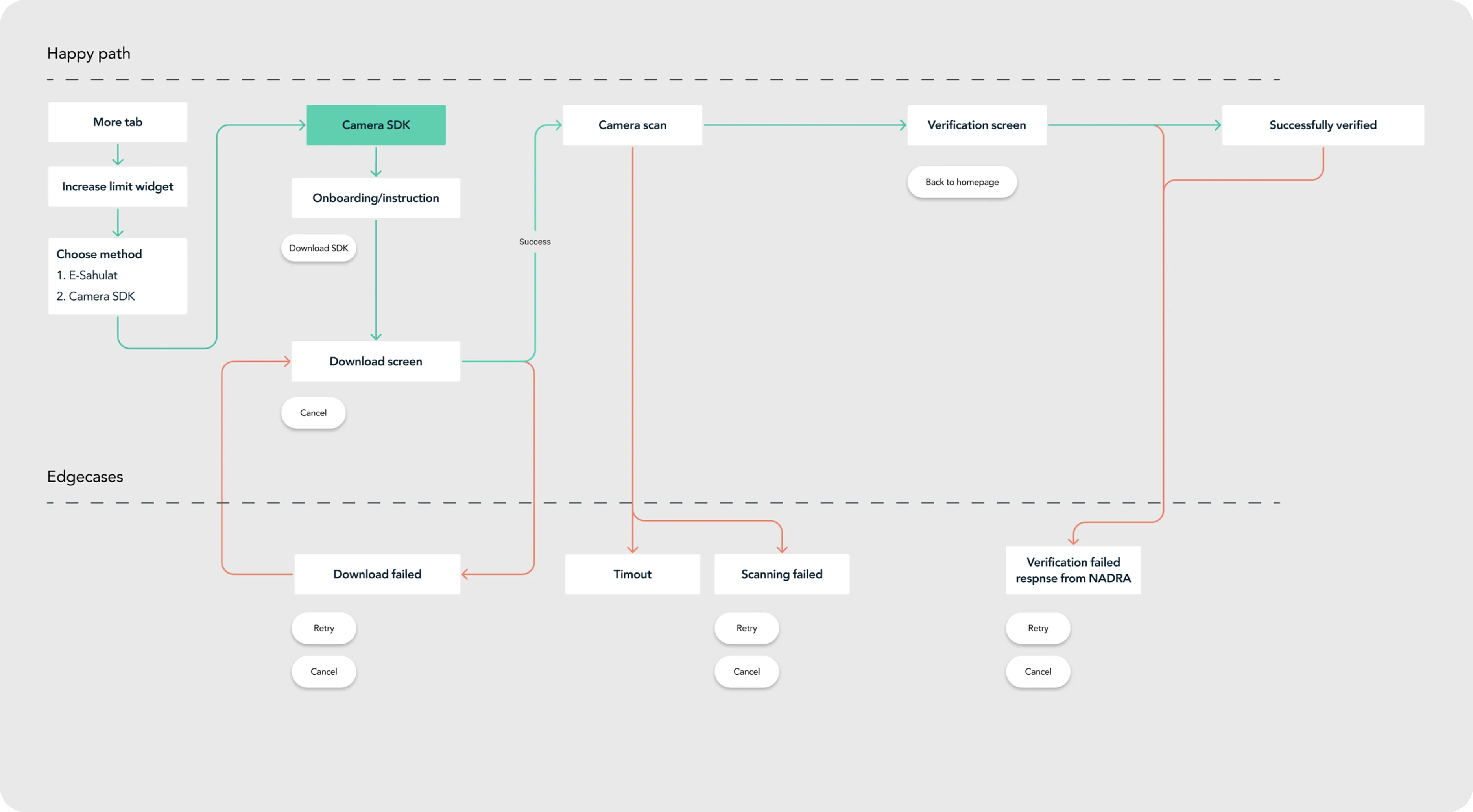
We ran a cross-functional workshop to map the happy path, entry points and failure states together. The SDK introduced real constraints: it had to download, needed two device permissions, scanned each hand separately and could return timeouts, failed captures or an unsuccessful NADRA response.
Treating those constraints as part of the product early helped us avoid designing a polished path that would fall apart as soon as something went wrong.
Five design decisions made the flow work
Meet users at the right moment
BVS could appear after KYC or later from the More tab, so customers were not forced through it before they needed a higher limit.
Use waiting time earlier
We explored downloading the camera SDK alongside KYC, reducing the chance that users met a long technical wait when they were ready to scan.
Prepare people before opening the camera
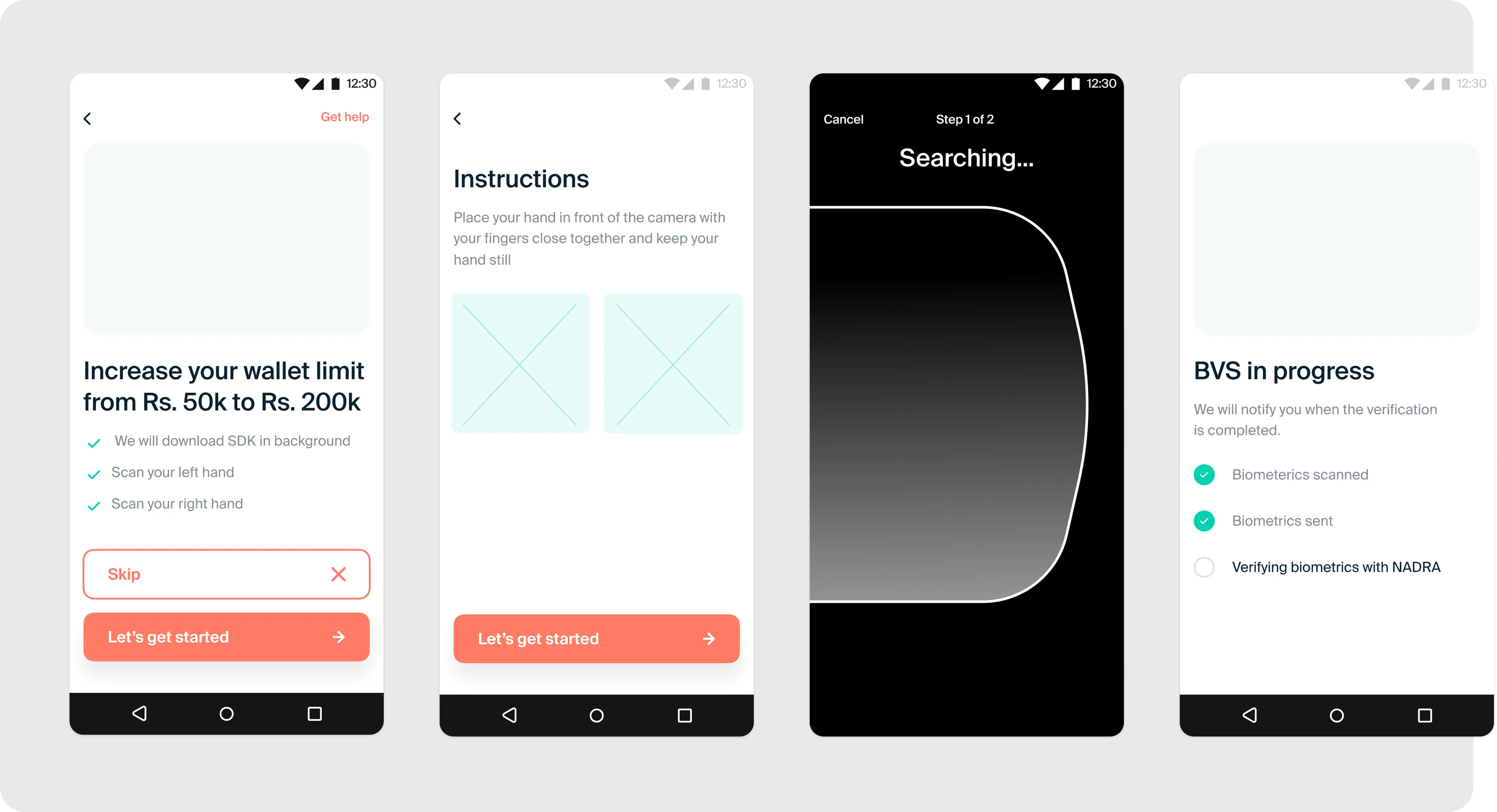
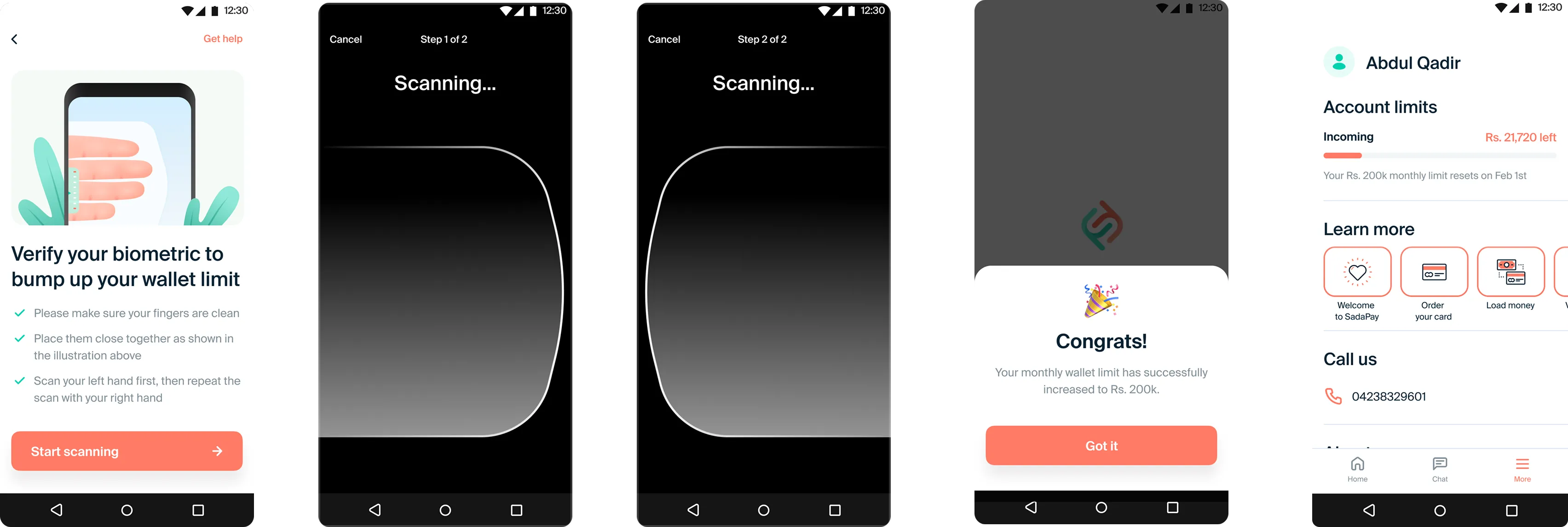
A short instruction screen explained clean hands, finger placement and the two-hand sequence before the SDK took over.
Design permission recovery
The SDK needed two device permissions. We mapped first-time requests, revoked camera access and denied states so users always knew the next step.
Keep verification status visible
After scanning, the product confirmed that biometrics were captured, sent and being checked with NADRA instead of leaving users uncertain.
The final experience kept the hard parts visible
The final journey prepared users before handing them to the scanning SDK, guided them through left and right hand capture, confirmed success and immediately showed the new PKR 200,000 limit inside the account.
When verification needed more time, a progress screen explained what had already happened and promised a notification on completion. This was important because the app could not always control how quickly NADRA returned a decision.
What changed
BVS moved fingerprint capture from an external e-Sahulat visit into the SadaPay app. Customers could initiate the upgrade securely from their phone, while the business gained an in-product route through a compliance bottleneck that had been blocking account growth.
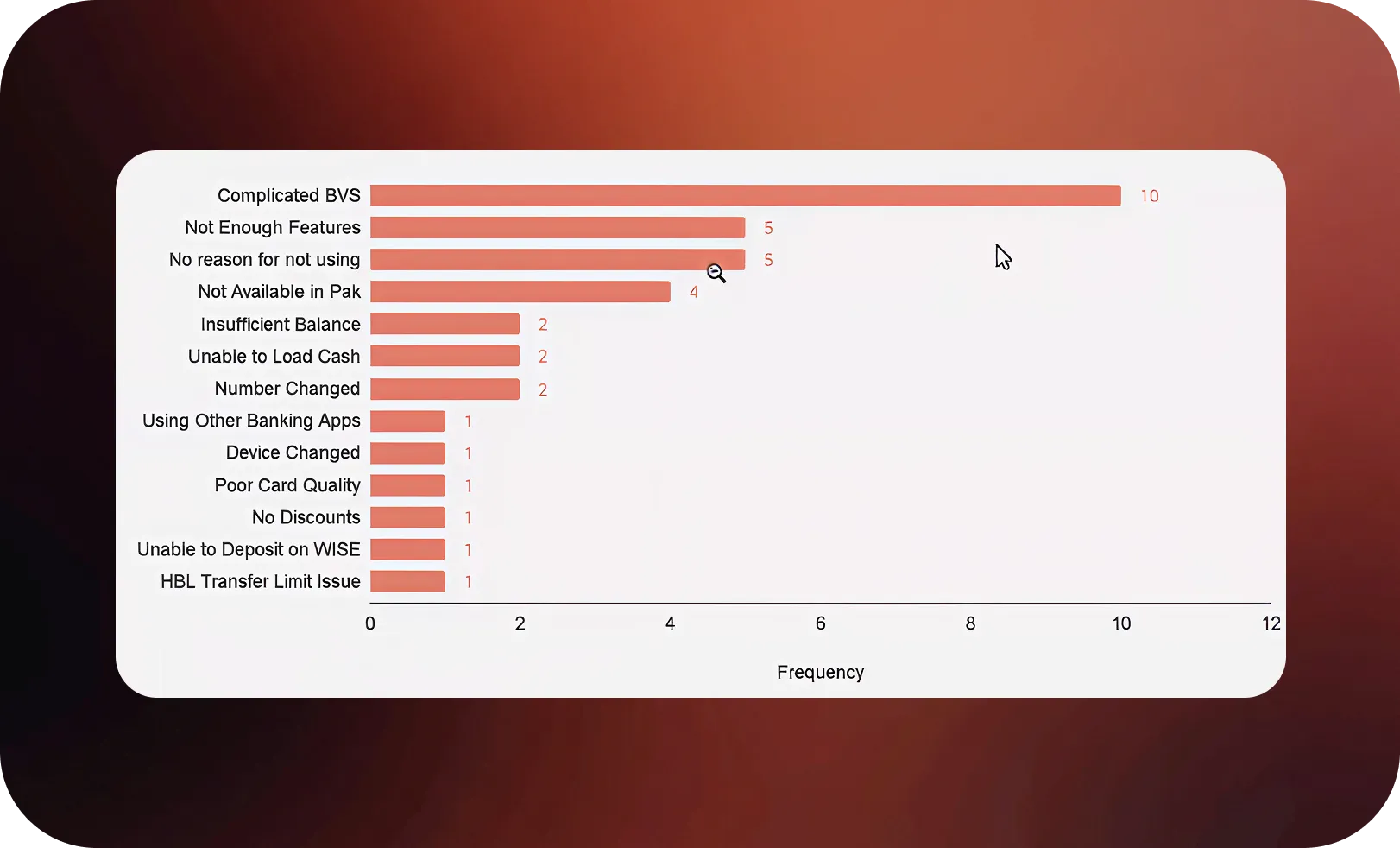
Launch was not the end of the work. A later support snapshot included 10 reports describing BVS as complicated. That signal was useful because it showed where the experience still needed clearer education and recovery, instead of treating launch as proof that every problem was solved.
What I carried forward
Technical constraints are product constraints. SDK loading, permissions and external response times must shape the journey from the start.
Preparation reduces failure. Clear guidance before opening the camera gives users a better chance of succeeding inside a system the app does not control.
Trust comes from honest status. Showing what is complete, what is still happening and what comes next is better than hiding unavoidable waiting.